

How to set Jio caller tune – methods and steps to set Jio caller tune[Set Jio caller tune]
Hii guys, welcome to FactWifi today in this article I gonna tell you that how to set Jio caller tune. Different methods and ways to set the Jio caller tune.
Jio gives you the best way to describe your feelings and to describe your mood by providing you the JioTunes. You can set JioTunes free of cost i.e. you do not need to pay for the JioTunes set on your number.
Users can change their caller tune several times and Jio will not charge them for that.
Before you know how to set Jio caller you have to know about JioTune. So, let’s start with JioTune.
[toc]
What is JioTune?
When someone calls you they hear a song or a tune in the place of default tone (i.e. Tring Tring) before you answer the call. That song or tune is called your caller tune and in Jio that song or tune is known as JioTune.
You can set a song as your JioTune which is available to set as JioTune. All songs are not available to be set as a JioTune. Only Jio users can set JioTune as their caller tune i.e. JioTunes are exclusively for Jio SIM card users.
There are millions of songs available to set as a JioTune choose one of the best as your Jio caller tune. Set the best song as your Jio caller tune. Jio caller tune and JioTune are the same things so do not be confused. So, let’s see How to set Jio caller tune.
Also Read:- 100+ Best Jio caller tune
What is JioSaavn?
JioSaavn is the music app of the Reliance Jio Telecommunication company. In this app, you can listen to the millions of song which is available in this application. Other network users can also use this app to listen to the songs which are available in the app.
Jio users can set a song as their JioTune from this application but other network users can’t.
Before presenting JioSaavn as Reliance Jio’s music app Jio has another music app named JioMusic. Jio collaborates his music app with the Saavn music app and formed a new app which is JioSaavn.
JioSaavn is one of the best music apps for music lovers. Users can listen to the songs available in different categories and different languages (Regional language). They also can listen to the songs of any particular singer such as Darshan Raval, Neha Kakkar, Armaan Malik.
JioSaavn app is available in the Google play store you can download it from there. If you are an Apple user you can download it from the Apple store. This application is also available for the PC (for laptops and desktops).
What is MyJio?
MyJio is the main app of Reliance Jio. In the MyJio app, you can view your current data plans of yours. You can check your usage (Data, Calls, SMS, WiFi). You can recharge any Jio no. from MyJio app and you can also link many Jio no. to the MyJio app on your device.
Jio offers and recharges plans can be viewed in this app. You also can access other Jio apps through the MyJio app like JioCinema, JioCloud, JioSecurity. Users can also set JioTunes from the MyJio app.

Users can check which Jio app is installed on their device. MyJio app is available in the Google play store you can simply download it from play store by searching MyJio in the search section in the play store.
Ways or methods to set a Jio caller tune
Jio users can set Jio caller tune by 4 methods.
Also read:- 100+ Best Jio caller tune
1. Set Jio caller tune through JioSaavn app
You (Jio users) can set Jio caller tune through the JioSaavn app. First of all, you need the JioSaavn app installed on your mobile phone. You can download the JioSaavn app from the Google play store.
Then after you have to log in to the JioSaavn app through your Jio sim card. It will auto-login to the JioSaavn music app.
After logging in you can search the song, you want to be your JioTune. And, select the “set as JioTune” option to set that song as your JioTune. When you click on the set as JioTune option, You will see an option to listen to the preview of that song which you want to set as your JioTune. Not all songs are available to set as a JioTune.
When you confirm the song to be set as your JioTune then, after few seconds, you will get a notification of JioTune activation on your Jio number. Jio also sends you an SMS of JioTune activation. Now that song is set as your caller tune.
Steps to set Jio caller tune through JioSaavn app:-
To set Jio caller tune via JioSaavn first, you need to install the JioSaavn application on your mobile phone. Then you have to open and login to JioSaavn app with your Jio number.
If you are using the internet from Jio sim then it will automatically log you into the JioSaavn app. Now, follow the below steps to set Jio caller tune.
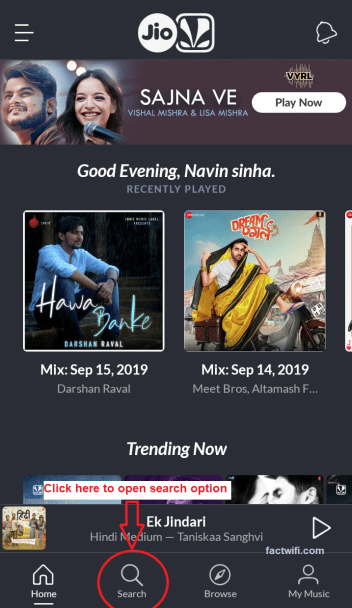
Step-1. Open the JioSaavn app and click on the search option, which is present left-below side on the app to open the search section.
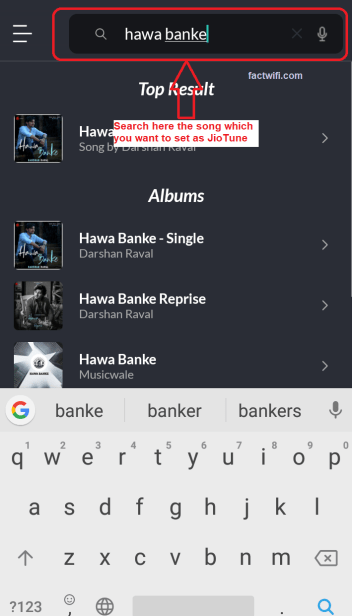
Step-2. Now search the song which you want to set as your JioTune.
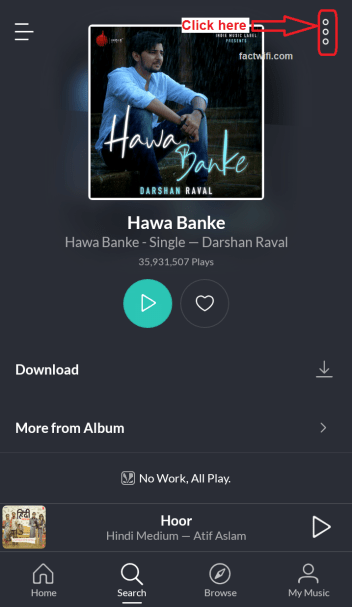
Step-3. Open that song which you search, and click on the 3 dots which is present in the top-right side on the screen.
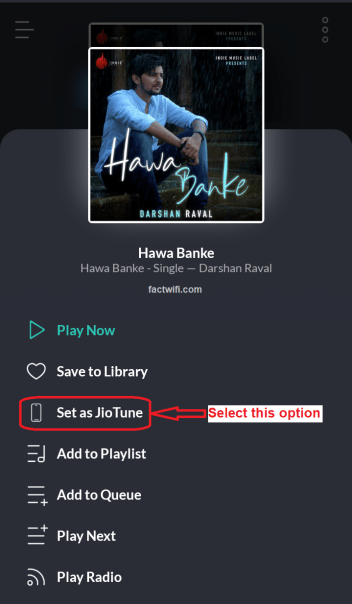
Step-4. After clicking on the 3 dots a menu appears where you have to select the option set as JioTune if that song is available to set as JioTune.
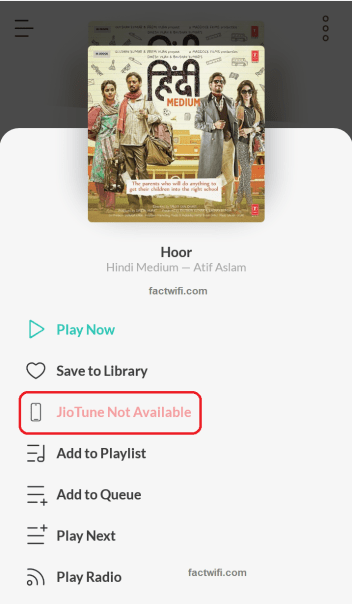
Note:- If that song is not available to be set as the JioTune then the option is disabled and it shows JioTune not available. You can not set Jio caller tune of that song which is not available as JioTune.
Step-5. When you click on the Set as JioTune option a pop up appears on the screen, where you can listen to the preview of that song.
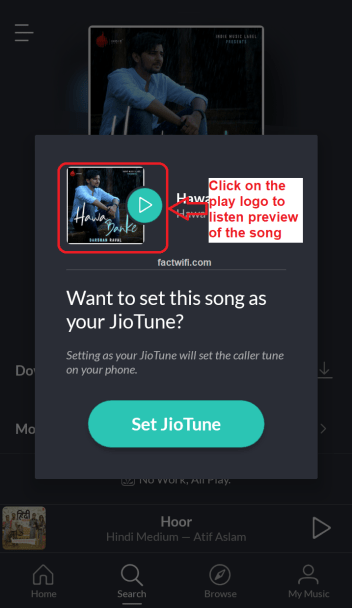
Step-6. After listening to the preview you have to click on the set JioTune option to set that song as your JioTune if you want that song as yours JioTune.

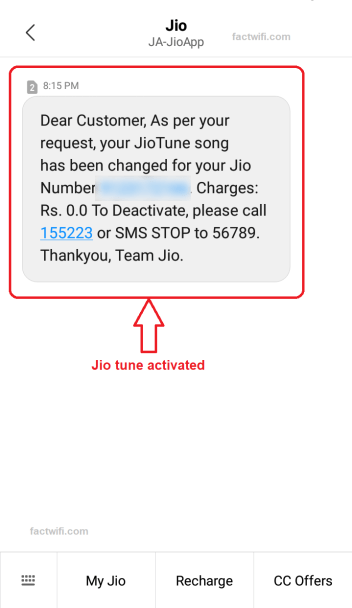
Step-7. When you click on Set JioTune option that song is activated as your JioTune and, Jio sends you a message which shows that JioTune is activated in your Jio number.
2. Set Jio caller tune through text message
If you do not have a proper Internet connection or you do not want to install the JioSaavn app, then you can set Jio caller tune by SMS. It is a simple process to set Jio caller tune without any internet connection.
For setting JioTune through SMS you have some option. Send song name to 56789 which you want to be your JioTune like SONG NAME and send it to 56789 to set Jio caller tune. Some other options are available:-
- ALBUM <album name> and send it to 56789
- SINGER <singer name> and send it to 56789
- MOVIE <movie name> and send it to 56789
When you send the message to Jio, then Jio will send you a list of songs of that name or related to that name (If that song is available as JioTune). Send your song number from the list to that SMS (If that song is available on that list).
Then Jio will send you a confirmation message to activate that song as your JioTune. Simply you have to do that send a “Y” in the reply of that message to set Jio caller tune. After then you will get a confirmation message from Jio that the JioTune is activated in your Jio number.
Steps to set Jio caller tune through text message:-
You can also set Jio caller tune through text messages if, you do not have an Internet connection. Follow the below steps to set Jio caller tune through text message.
Step-1. Open your default messaging app and SMS JT to 56789 or SMS the specific song name to 56789 (it is pre-saved in your Jio sim card named Dialer Tune or Entertainment).
Some other options are:-
- ALBUM <album name> and send it to 56789.
- SINGER <singer name> and send it to 56789.
- MOVIE <movie name> and send it to 56789.
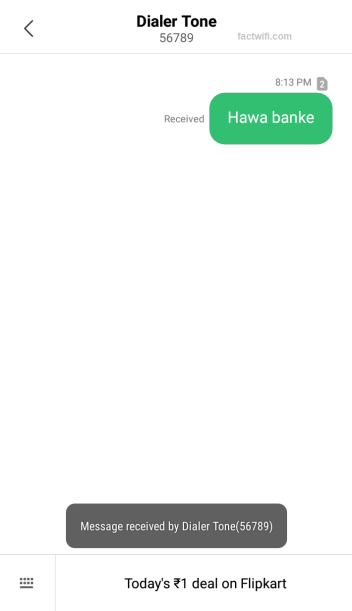
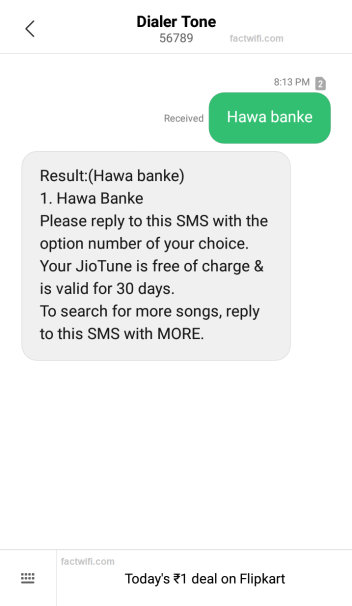
Step-2. If the song which you search is available to set as JioTune then, Jio sends you a reply with the result of your search. Now reply with your option.
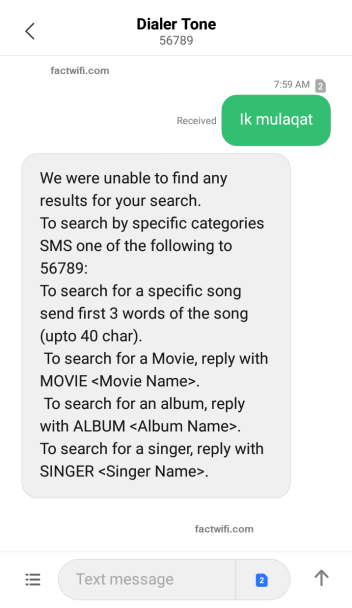
Note:- If the song which you search is not available to set as JioTune then, Jio sends you a message that they are unable to find your search.
Step-3. When you reply with your option then, Jio sends you another message i.e. to set that song for all callers. reply with 1 to that SMS.
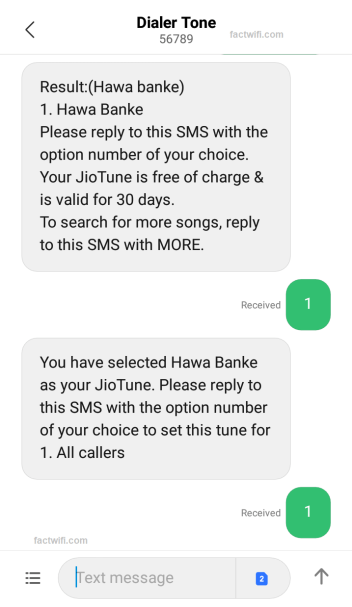
Step-4. After replying to that SMS Jio sends you another SMS i.e. they have received your request.
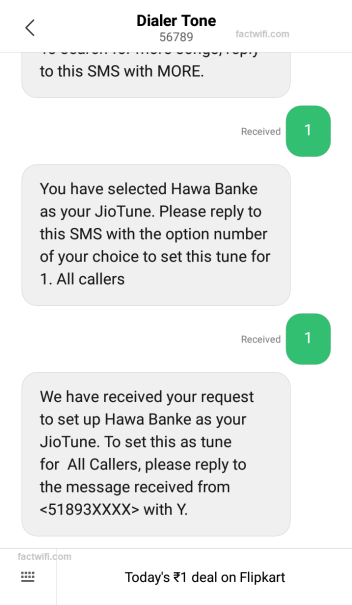
Steps-5. Jio sends to one more SMS i.e. confirmation message you have to reply with Y to that SMS.
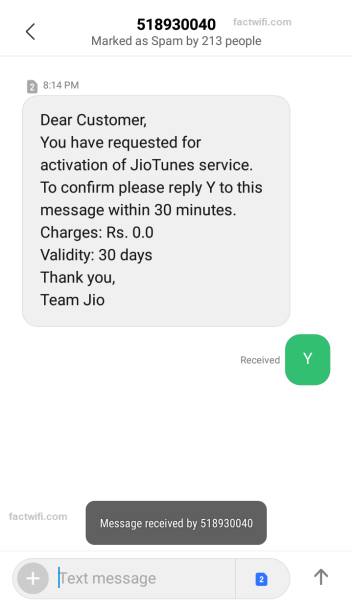
Step-6. When you reply with Y to that SMS Jio sends you a message of the JioTune activation.
Also read: How to change Jiofi Username and Password?
3. Set Jio caller tune by copying
You can also set Jio caller tune by copying it from other Jio users. When you call any Jio user and, if that user has JioTune set as his caller tune then, you hear the option to copy that JioTune. But by copying you can only set that particular song which is set on that user’s number from which you copied.
To copy that JioTune simply you have to press the “*” Asterisk button or Star button. After that Jio sends a message to your phone to confirm the activation of that JioTune. Reply “Y” to that message and that JioTune is copied and set as your JioTune.
Steps to set Jio caller tune by copying:-
You can set Jio caller tune by copying it, copy JioTune of another Jio user if you like their caller tune.
Step-1. Call that person whose caller tune you want to copy.
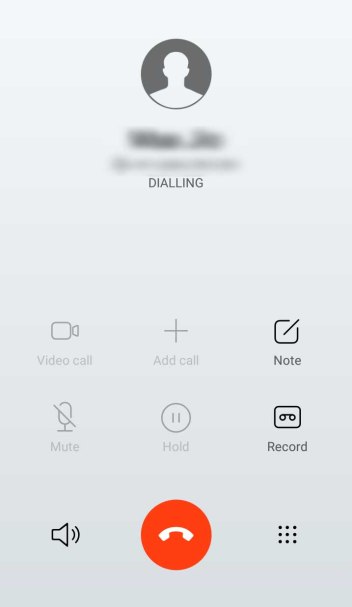
Step-2. Listen to the song and then press the “*” Asterisk button to copy that song.
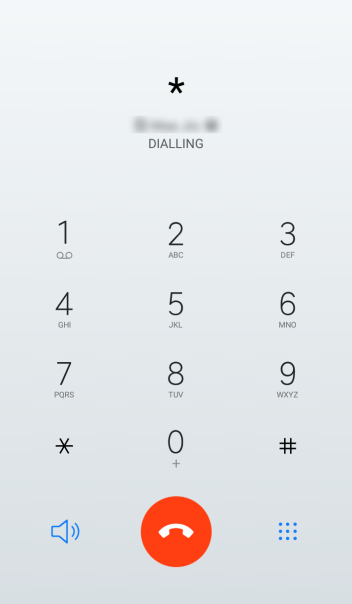
Step-3. When you press the “*” Asterisk button to copy the JioTune then Jio will sends you a confirmation message, reply Y to that SMS.
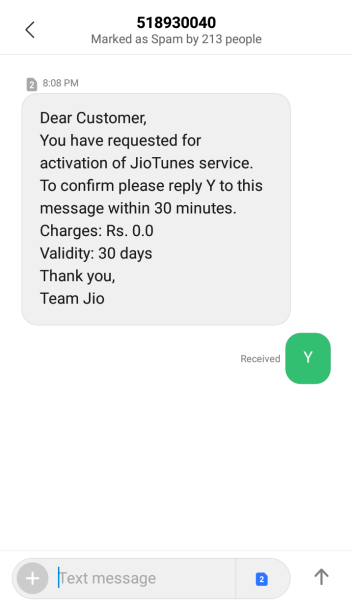
Step-4. After replying Y to that SMS Jio sends you an activation message i.e. the JioTune song is activated on your Jio number.
4. Set Jio caller tune through MyJio app
You can also set Jio caller tune through the MyJio app. First, you need to install the MyJio app on your device from the Google play store. After installing the MyJio app you need to log in to the app through Jio SIM card. Now open the MyJio app and select the JioTunes option which is present in the menu.
Now the JioTunes page has appeared on the screen where you can search the song, which you want to be your JioTune. And, select the “set as JioTune” option to set that song as your JioTune.
When you click on the set as JioTune option, You will see an option to listen to the preview of that song which you want to set as your JioTune. Listen to the preview and select “set as Jio tune” to confirm. After that, you will see a confirmation message on the screen that shows the activation of the JioTune.
Steps to set Jio caller tune through MyJio app:-
To set Jio caller tune in your device via MyJio application, you need to install the MyJio app on your mobile phone and then, you have to open and login to MyJio app with your Jio number. If you are using the internet from Jio sim then it will automatically log you into the MyJio app. Now, follow the below steps to set Jio caller tune.
Step-1. Open MyJio application and click on the 3 lines which are on the top-left side on the home screen of MyJio app.
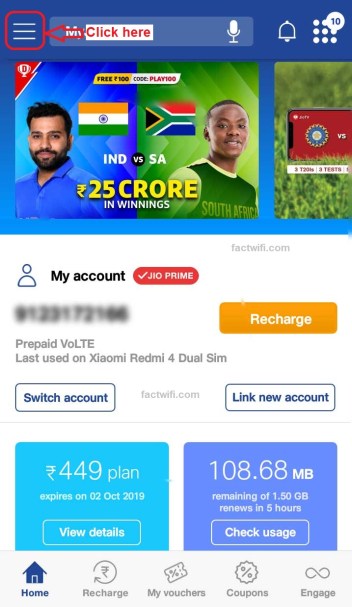
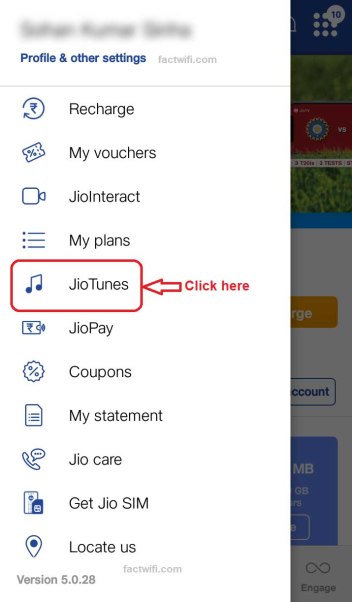
Step-2. When you click on the 3 lines a sidebar appears, where you see an option JioTunes click on that option.
Step-3. When you click on the JioTunes option a menu appears where you can select or search the song which you want to set as your JioTune in the search box. Search box is present on the top of the screen of that page.
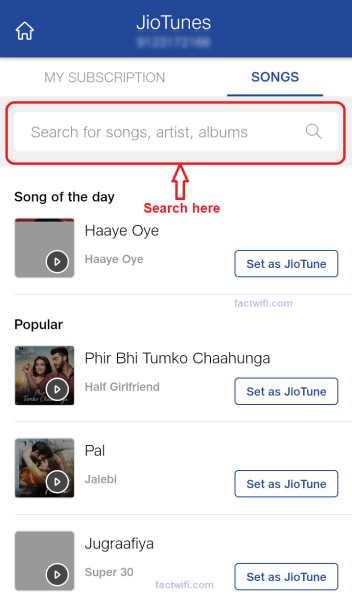
Step-4. After searching the song you can listen to the preview of that song by clicking on the play button.

Step-5. Now click on set as JioTune option to set that song as your JioTune and that song is activated as your JioTune.
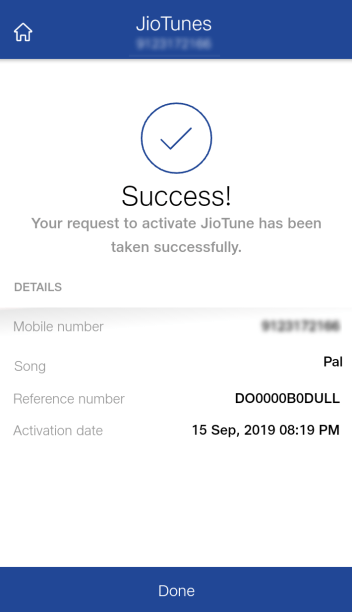
And Jio will send you an activation message on your device in which your Jio sim with that number in which you set the caller tune is in.
How to deactivate a JioTune?
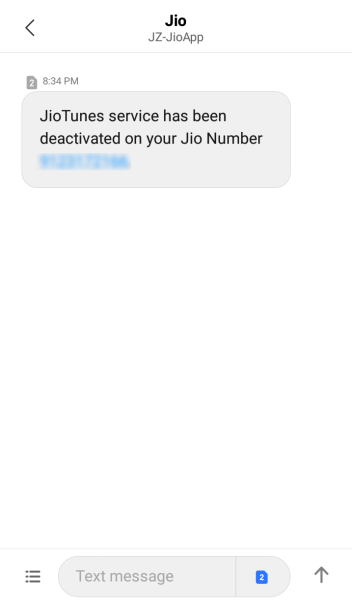
If you want to remove or to deactivate your JioTune simply you have to send the STOP message to 56789. After then Jio sends you a confirmation message reply 1 to that message to confirm. Now your JioTune is deactivated.
Steps to deactivate Jio caller tune:-
Step-1. To stop or to deactivate the Jio caller tune first you have to SMS STOP to 56789.
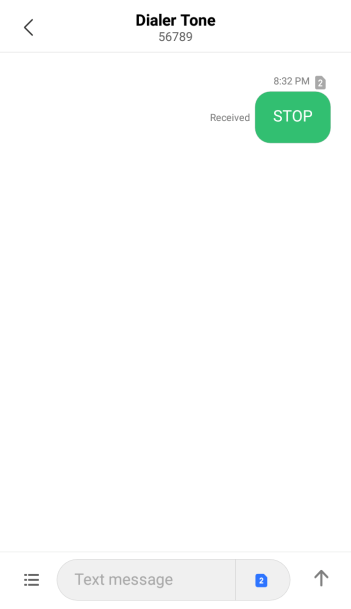
Step-2. Then Jio will send you a confirmation message reply with 1 to that SMS for confirmation.
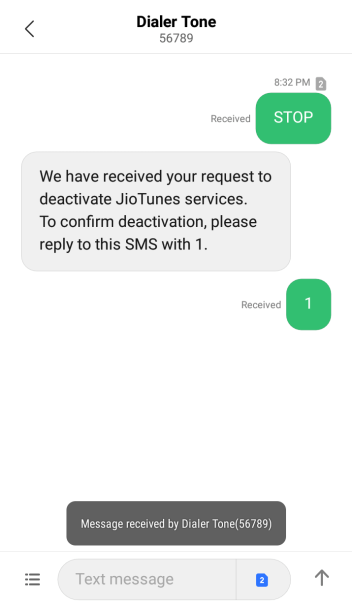
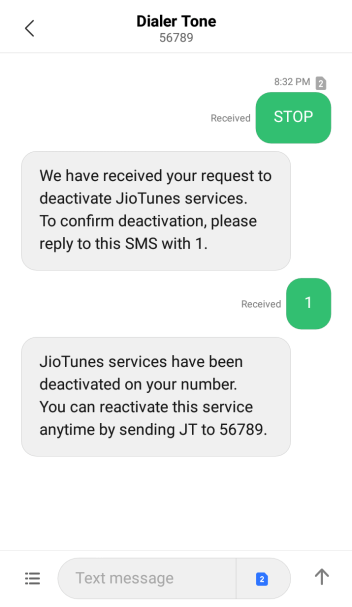
Step-3. When you reply 1 to the confirmation SMS Jio sends you a message that your JioTune is deactivated.
How to set Jio caller tune FAQs:-
Is Caller Tune in Jio free?
Yes, Jio caller tunes are free of cost in Jio and you (Jio users) have not to pay for it. You can set Jio caller tune in your Jio SIM card, which your callers will listen to.
When someone calls me can they hear the music?
Yes, when someone calls you they will hear the song which you have been set as your Jio caller tune. Set the best JioTune as you caller tunes for your callers or someone special.
How can I set a free caller tune in Jio?
You can set Jio caller tune for free in your Jio SIM through the JioSaavn app, through the MyJio app, through SMS or by copy via ‘*’.
- Install and open the JioSaavan app.
- Go to the search section in the JioSaavn app.
- Search the song name to set as JioTune.
- If the song is available as JioTune.
- Then listen to the preview and click on set JioTune to set Jio caller tune.
- Now that song is activated as JioTune on your Jio number.
What is the number of Jio caller tune?
56789 is the Jio caller tune number. This number is already saved in your Jio SIM card, with the name Dialer tone.
How can I listen to my activated Jio caller tune?
You can listen to your activated Jio caller tune via MyJioapp.
- Open the MyJio app and click on the three bars present on the top left side.
- Now click on JioTunes option.
- In JioTunes menu you have to go in My Subscription module.
- Here in My Subscription module, you can listen to your activated Jio caller tune.
How do I remove the Jio caller tune from Jio?
You (Jio users) can remove or deactivate the Jio caller tune from your Jio SIM card by sending STOP SMS to 56789.
- Send STOP SMS to 56789.
- Then Jio sends you a confirmation message reply 1 to that SMS.
- Now Jio caller tune service is stopped in your Jio number.
Also read:- Cloud Hosting: What is Cloud Hosting and how does it work?
conclusion:-
I think all of your doubt related to Jio caller tune is cleared now. If you have any other queries related to this article then you can ask me in the comment section below or You can mail me at factwifi@gmail.com.
Thank you for reading this article. You can follow FactWiFi on social media sites.












 technology blog