

JioFi 4 Password Change or How to JioFi 4 Password Change?
Welcome guest in our JioFi 4 password change article. If you are searching JioFi 4 password change on the internet then this is a suitable article for you.
Today you will know about how to JioFi 4 password change step by step.
In this article, we have written the complete steps for changing the password of the JioFi 4 device with screenshots. The screenshot gives a better understanding of the JioFi 4 password change. So you must read this article till the end because each line is may be helpful for you.
I am sure, after reading this article you can easily change your JioFi 4 device password. So let’s get started.
Also read: How to login to Jio Wifi Admin?
[toc]
JioFi 4 Password Change: What is the JioFI 4 device?

JioFi 4 is a 4G portable hotspot device which helps you to access the high-speed 4G internet anywhere. This device is launched by Reliance Jio. JioFi is used as a Wi-Fi to access the internet.
Multiple users can connect to the JioFi at the same time to access the internet. But, if multiple users are connected at the same time the internet speed gets falling down. Because it has a limited speed.
This device allows to connect more than 30 devices at the same time, but I recommend connect upto 10 devices at a time for better internet speed.
What are the Features of the JioFi 4 device?
JioFi 4 is a portable 4G device, it means you can easily carry this device from one place to another. You can also carry JioFi 4 device in your pocket, bag, etc.
JioFi 4 is the 4th generation product of the JioFi series. It contains a 2600mAh battery and 1 A charger which takes approx 3 hrs for being fully charged. Its battery lasts for 8 hrs and has a memory card slot too for data storing.
This device is known as true 4G device because the downloading speed of the JioFi device is 150 Mbps and uploading speed is up to 50 Mbps.
It allows us to connect up to 32 devices at the same time. You can use this device as a wifi device on your home, office, workplace, etc. Because this is the wireless and portable 4G device
Also read: What is Cloud Web Hosting?
What is JioFi 4 Password Change Steps?
To change your JioFi 4 password must follow the below steps. All steps are important so read carefully:
- First power-on your JioFi 4 device.
- Connect your JioFi 4 device to your mobile or computer through Wifi.
- After connecting, open any of Web Browser such as Google Chrome, Firefox, etc.
- Visit http://jiofi.local.html or simply click me.
- After clicking the above links JioFi Admin login website will open.
- You will see the Login Button on the right side of the JioFi Admin login website homepage.
- Enter JioFi Admin Username and Password (both are administrator before changing) and click the login button.
- Click SETTING Button then click User Management.
- A form will be open where you can change your device password and USSID (Wifi name).
- Enter a new password and once again confirm password then click the Update button.
- Now, your JioFi 4 device password has changed. And you can connect to your JioFi device to Computer or Mobile Phone with the new password or changed password.
Steps for JioFi 4 Password Change with the screenshots:
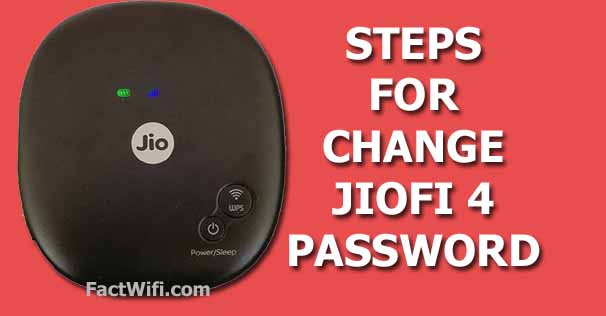
Below the complete steps are written for JioFi 4 password change. If you follow these steps carefully then you can easily change the password of your JioFi 4 device.
STEP-1:
First, you need to switch on your JioFi 4 device for changing the password. To hold down the power button continue 3 seconds of your JioFi 4 device. The power button is located on the front side of the JioFi 4 device. After your JioFi 4 device power on then follow the second step.
STEP-2:
When your JioFi 4 device is powered on, you need to connect it with your Mobile Phone or a Computer. You need a password to connect JioFi device with your Mobile Phone or Computer for internet access and JioFi 4 password change.
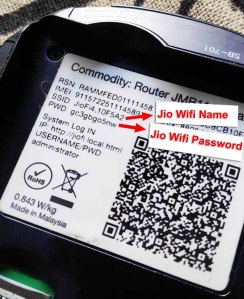
If you want to know the default password of the JioFi 4 device then you check the container or box in which the JioFi device is kept.
You can also check the backside of the JioFi 4 device where the SSID (Service Set Identifier) and Password are printed. look at the below screenshot.
When your Computer or Mobile is connected with your JioFi 4 device. Then you have to follow the next steps.
STEP-3:
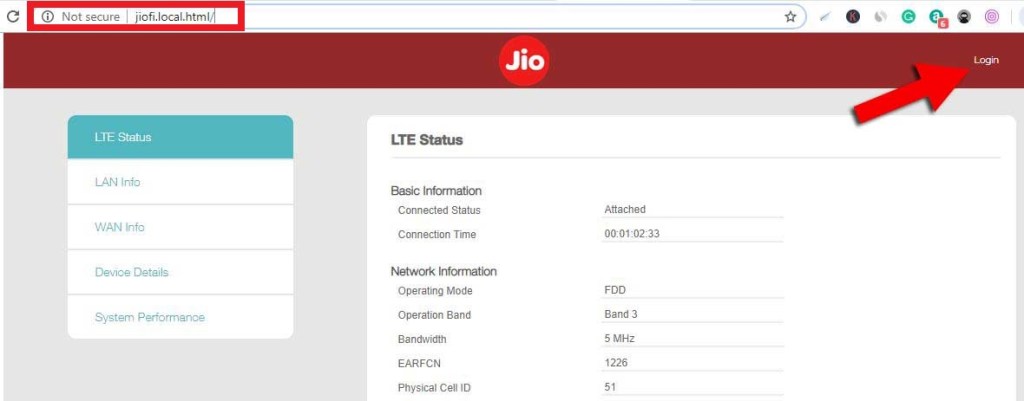
Open any one of the Web Browser like Google Chrome, Uc Browser, etc and visit http://jiofi.local.html the website.
Or you can simply click the below link to open JioFi Admin Login for JioFi 4 password change.
http://jiofi.local.html or http://192.168.11.
After visiting the above link the JIoFi official website will open where you need to login in. The login button is located on the top right side of the Website home page.
STEP-4:
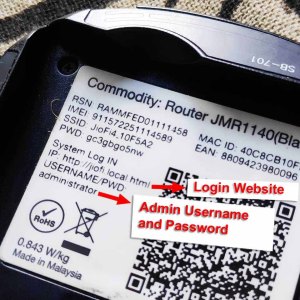
To log in, you need the JioFi Username and Password these are not your JioFi Wifi password, these are the JioFi Admin password.
If you want to know about the Username and Password for JioFi admin login, both are printed at the backside (under the battery) of the JioFi 4 device.
Generally, JioFi Admin Username and Password both are “administrator” for any JioFi device, you must note down on a page or notepad.
When you click on the login button a form will appear, where you enter the JioFi Admin Username and Password and click Login Button at the below of the form.

STEP-5:
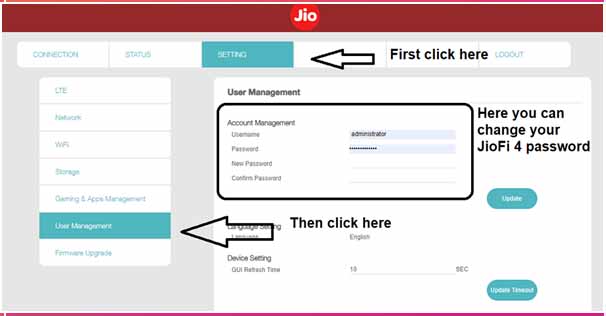
After login, then you go to on the setting menu and in the setting menu, you have to click on the User Management button. After clicking, the Username and Password changing form will open.
Then you type the username in the Username field and type the old password in the Password field.
And also type the new password in the New Password field and finally, type confirm the password in the Confirm Password field.
After filling all fields you have to click the Update button at the right bottom side of the login form.
STEP-6:
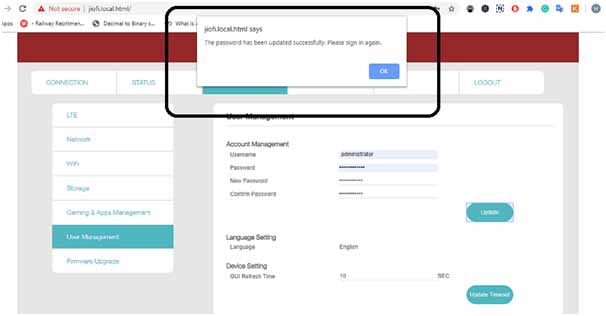
After clicking the Update button your JioFi 4 password has been changed or updated and a pop-up message will appear where you will see “The Password has been updated successfully. Please sign again“. And you have to sign in again with your new password.
I hope you have to understand the password changing process of the JioFi 4 device. If you have any queries about JioFi 4 password change. You can drop a comment in the below comment box.
Why JioFi Launched?
A few years ago 3G or 2G mobile phone users use slow networks to access the internet, then reliance Jio makes a very good change in it by introducing JioFi.
Well, the JioFi is for those users who do not have a 4G compatible device and uses the same 2G or 3G device to connect with the internet. Jio is trying to get that customer and providing them the best way to connect with the digital world 4G connection by providing them the series of JioFi devices.
For more details about JioFi 4 password change watch the youtube video.
What is JioFi Series?
Reliance Jio launched a series of JioFi is as follows:
- JioFi-1
- JioFi-2
- JioFi-3
- JioFi-4
- JioFi-5
- JioFi-6
JioFi 4 password change:- Why JioFi 4 password-change?
You have to regularly change your JioFi password to prevent it from unnecessary accessing of data. If many users are accessing your JioFi router you will face slow speed in browsing.
So, you need to change your JioFi password. In the above article, you have to see the steps for your JioFi 4 password change.
FAQs for JioFi 4 password change
What is the JioFi device default password?
Many of you have a query that, what is JioFi 4 device default password and how we know that what is JioFi 4 default password.
So, here is the answer to the above question. You can get your JioFi 4 device password from the box in which your JioFi 4 device is kept when you buy a JioFi 4 device. The default password of the JioFi device is print on the backside of that box.
You can also get the password from your JioFi device, the default password is also print inside your JioFi device under the battery.
What is the JioFi default login password?
What is JioFi default login password to log in and change JioFi 4 device password and where to get it? You can get your JioFi 4 login password from the box in which your JioFi 4 device is kept when you buy a JioFi 4 device. The default login password of the JioFi device is print on the backside of that box.
You can also fetch the login password of your JioFi device, the default login password is also print inside your JioFi device under the battery.
Is the JioFi device default password and default login password the same?
No, the JioFi default password and login default password are not the same. Both passwords are different, JioFi device password is required to connect your JioFi device with your pc, laptop, and mobile phones to access the internet.
Whereas the JioFi device login password comes with a user ID which is used to login to the Jio server.
How to turn on or off JioFi 4 device?
To turn on or off your JioFi 4 device you have to hold down the power button for 3 to 4 seconds. The power button is located on the front side of your JioFi device. This process is working for both to turn on or off your JioFi 4 device.
What is the default user ID and password to log in to the Jio server?
The default user ID and password which you need to log in to the Jio server for JioFi 4 password change is the administrator.
The default user ID is also printed with the login password on the backside of the box in which your JioFi 4 device is kept.
JioFi 4 password change process and another JioFi device password change process are the same or not?
Yes, all the JioFi device password change process is the same. It doesn’t matter the modal of the JioFi devices. But the reset process of each JioFi device is maybe same or may not.
This article is only about the JioFi 4 password change. For more details visit our home page.
Conclusion!
I hope guys, after reading JioFi 4 password change article you have to collect the information for changing your JioFi 4 device password. If you have any questions about the JioFi 4 password change, you must write your questions in the comment box. I will try to give a reply to your all questions.
So finally thank you for reading this article.
 technology blog