How to set Jio caller tune – methods and steps to set Jio caller tune[Set Jio caller tune]

How to set Jio caller tune or JioTune

How to set Jio caller tune – methods and steps to set Jio caller tune[Set Jio caller tune]

Hii guys, welcome to FactWifi today in this article I gonna tell you that how to set Jio caller tune. Different methods and ways to set the Jio caller tune.

Jio gives you the best way to describe your feelings and to describe your mood by providing you the JioTunes. You can set JioTunes free of cost i.e. you do not need to pay for the JioTunes set on your number.

Users can change their caller tune several times and Jio will not charge them for that.

Before you know how to set Jio caller you have to know about JioTune. So, let’s start with JioTune.

[toc]

What is JioTune?

When someone calls you they hear a song or a tune in the place of default tone (i.e. Tring Tring) before you answer the call. That song or tune is called your caller tune and in Jio that song or tune is known as JioTune.

You can set a song as your JioTune which is available to set as JioTune. All songs are not available to be set as a JioTune. Only Jio users can set JioTune as their caller tune i.e. JioTunes are exclusively for Jio SIM card users.

There are millions of songs available to set as a JioTune choose one of the best as your Jio caller tune. Set the best song as your Jio caller tune. Jio caller tune and JioTune are the same things so do not be confused. So, let’s see How to set Jio caller tune.

Also Read:- 100+ Best Jio caller tune 

What is JioSaavn?

JioSaavn is the music app of the Reliance Jio Telecommunication company. In this app, you can listen to the millions of song which is available in this application. Other network users can also use this app to listen to the songs which are available in the app.

Jio users can set a song as their JioTune from this application but other network users can’t.

Before presenting JioSaavn as Reliance Jio’s music app Jio has another music app named JioMusic. Jio collaborates his music app with the Saavn music app and formed a new app which is JioSaavn.
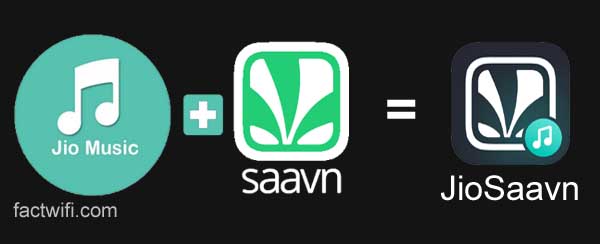
JioMusic+Saavn=JioSaavn

JioSaavn is one of the best music apps for music lovers. Users can listen to the songs available in different categories and different languages (Regional language). They also can listen to the songs of any particular singer such as Darshan Raval, Neha Kakkar, Armaan Malik.

JioSaavn app is available in the Google play store you can download it from there. If you are an Apple user you can download it from the Apple store. This application is also available for the PC (for laptops and desktops).

What is MyJio?

MyJio is the main app of Reliance Jio. In the MyJio app, you can view your current data plans of yours. You can check your usage (Data, Calls, SMS, WiFi). You can recharge any Jio no. from MyJio app and you can also link many Jio no. to the MyJio app on your device.

Jio offers and recharges plans can be viewed in this app. You also can access other Jio apps through the MyJio app like JioCinema, JioCloud, JioSecurity. Users can also set JioTunes from the MyJio app.

MyJio-app

Users can check which Jio app is installed on their device. MyJio app is available in the Google play store you can simply download it from play store by searching MyJio in the search section in the play store.

Ways or methods to set a Jio caller tune

Jio users can set Jio caller tune by 4 methods.

  1. Through the JioSaavn app.
  2. Through text message.
  3. By copying.
  4. Through MyJio app

Also read:- 100+ Best Jio caller tune

1. Set Jio caller tune through JioSaavn app

You (Jio users) can set Jio caller tune through the JioSaavn app. First of all, you need the JioSaavn app installed on your mobile phone. You can download the JioSaavn app from the Google play store.

Then after you have to log in to the JioSaavn app through your Jio sim card. It will auto-login to the JioSaavn music app.

After logging in you can search the song, you want to be your JioTune. And, select the “set as JioTune” option to set that song as your JioTune. When you click on the set as JioTune option, You will see an option to listen to the preview of that song which you want to set as your JioTune. Not all songs are available to set as a JioTune.

When you confirm the song to be set as your JioTune then, after few seconds, you will get a notification of JioTune activation on your Jio number. Jio also sends you an SMS of JioTune activation. Now that song is set as your caller tune.

Steps to set Jio caller tune through JioSaavn app:-

To set Jio caller tune via JioSaavn first, you need to install the JioSaavn application on your mobile phone. Then you have to open and login to JioSaavn app with your Jio number.

If you are using the internet from Jio sim then it will automatically log you into the JioSaavn app. Now, follow the below steps to set Jio caller tune.

Step-1. Open the JioSaavn app and click on the search option, which is present left-below side on the app to open the search section.
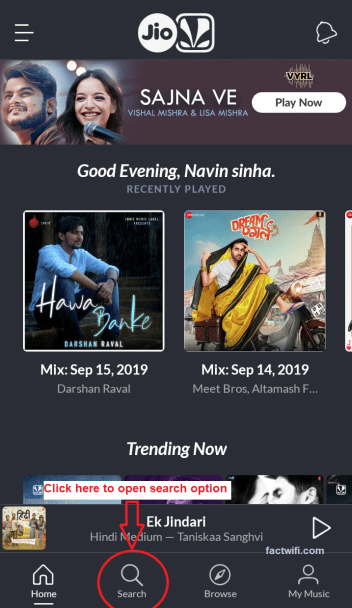
setting JioTune through JioSaavn app Step-1

Step-2. Now search the song which you want to set as your JioTune.
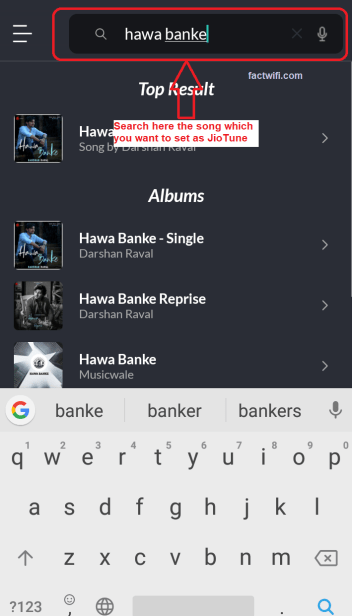
setting JioTune through JioSaavn app Step-2

Step-3. Open that song which you search, and click on the 3 dots which is present in the top-right side on the screen.
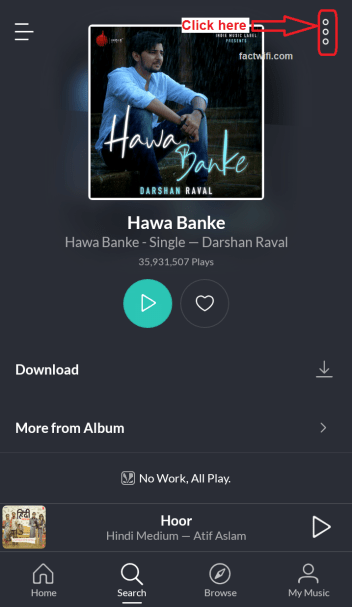
setting JioTune through JioSaavn app Step-3

Step-4. After clicking on the 3 dots a menu appears where you have to select the option set as JioTune if that song is available to set as JioTune.
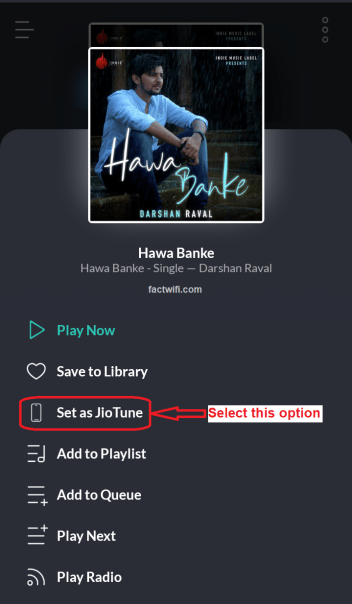
setting JioTune through JioSaavn app Step-4

Note:- If that song is not available to be set as the JioTune then the option is disabled and it shows JioTune not available. You can not set Jio caller tune of that song which is not available as JioTune.
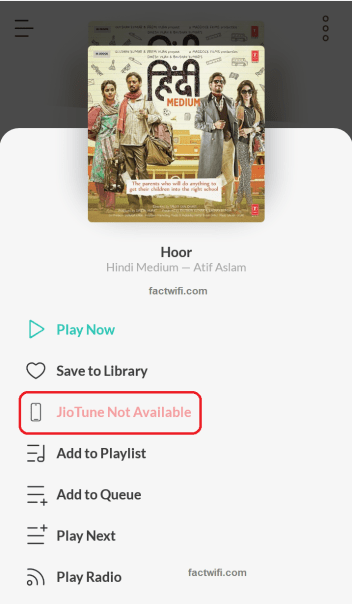
setting JioTune through JioSaavn app error song not available

Step-5. When you click on the Set as JioTune option a pop up appears on the screen, where you can listen to the preview of that song.
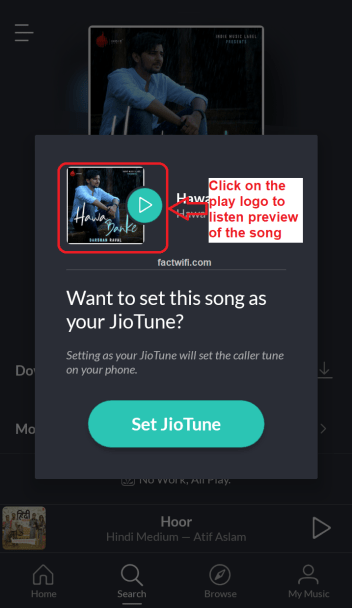
setting JioTune through JioSaavn app Step-5

Step-6. After listening to the preview you have to click on the set JioTune option to set that song as your JioTune if you want that song as yours JioTune.

setting JioTune through JioSaavn app Step-6

Step-7. When you click on Set JioTune option that song is activated as your JioTune and, Jio sends you a message which shows that JioTune is activated in your Jio number.
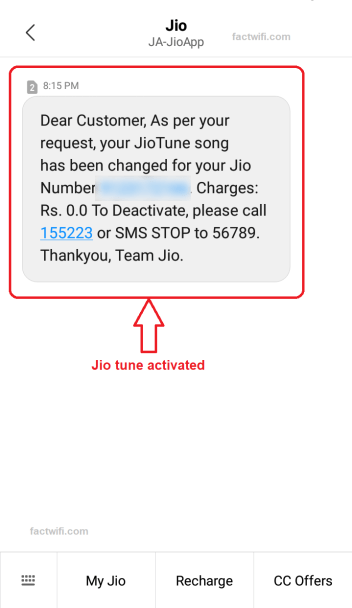
setting JioTune through JioSaavn app Step-7

2. Set Jio caller tune through text message

If you do not have a proper Internet connection or you do not want to install the JioSaavn app, then you can set Jio caller tune by SMS. It is a simple process to set Jio caller tune without any internet connection.

For setting JioTune through SMS you have some option. Send song name to 56789 which you want to be your JioTune like SONG NAME and send it to 56789 to set Jio caller tune. Some other options are available:-

  • ALBUM <album name> and send it to 56789
  • SINGER <singer name> and send it to 56789
  • MOVIE <movie name> and send it to 56789

When you send the message to Jio, then Jio will send you a list of songs of that name or related to that name (If that song is available as JioTune). Send your song number from the list to that SMS (If that song is available on that list).

Then Jio will send you a confirmation message to activate that song as your JioTune. Simply you have to do that send a “Y” in the reply of that message to set Jio caller tune. After then you will get a confirmation message from Jio that the JioTune is activated in your Jio number.

Steps to set Jio caller tune through text message:-

You can also set Jio caller tune through text messages if, you do not have an Internet connection. Follow the below steps to set Jio caller tune through text message.

Step-1. Open your default messaging app and SMS JT to 56789 or SMS the specific song name to 56789 (it is pre-saved in your Jio sim card named Dialer Tune or Entertainment).

Some other options are:-

  • ALBUM <album name> and send it to 56789.
  • SINGER <singer name> and send it to 56789.
  • MOVIE <movie name> and send it to 56789.
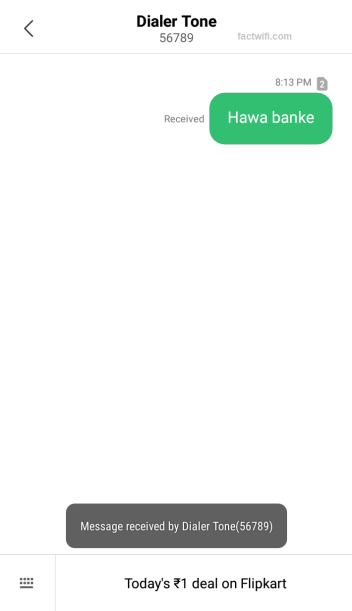
setting JioTune through SMS Step-1

Step-2. If the song which you search is available to set as JioTune then, Jio sends you a reply with the result of your search. Now reply with your option.
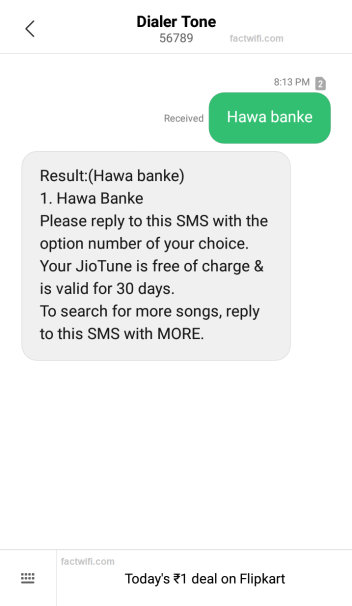
setting JioTune through SMS Step-2

Note:- If the song which you search is not available to set as JioTune then, Jio sends you a message that they are unable to find your search.
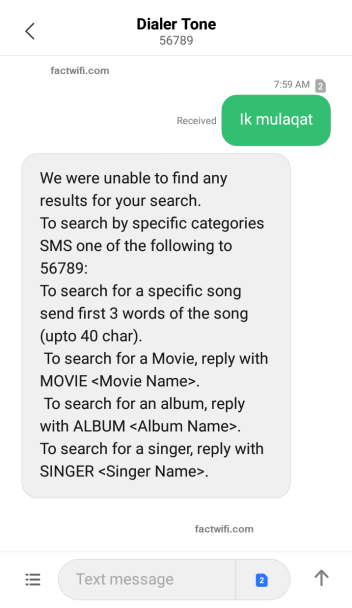
setting JioTune through SMS song not found

Step-3. When you reply with your option then, Jio sends you another message i.e. to set that song for all callers. reply with 1 to that SMS.
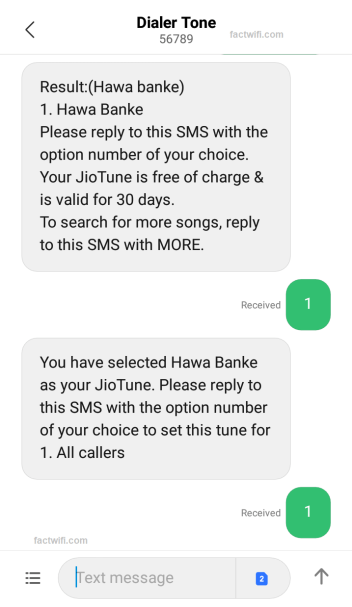
setting JioTune through SMS Step-3

Step-4. After replying to that SMS Jio sends you another SMS i.e. they have received your request.
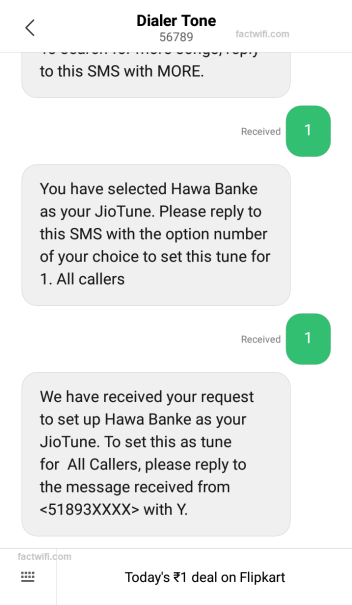
setting JioTune through SMS Step-4

Steps-5. Jio sends to one more SMS i.e. confirmation message you have to reply with Y to that SMS.
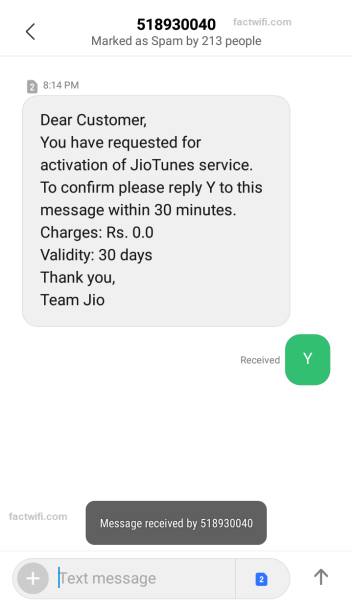
setting JioTune through SMS Step-5

Step-6. When you reply with Y to that SMS Jio sends you a message of the JioTune activation.

setting JioTune through SMS Step-6

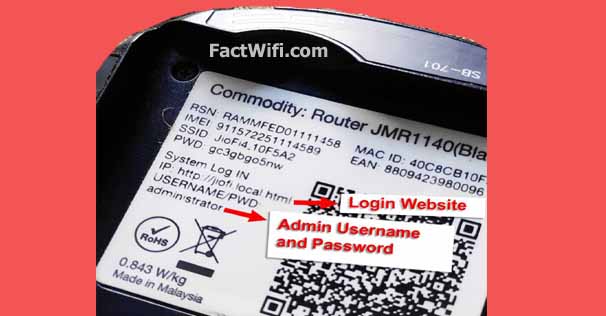
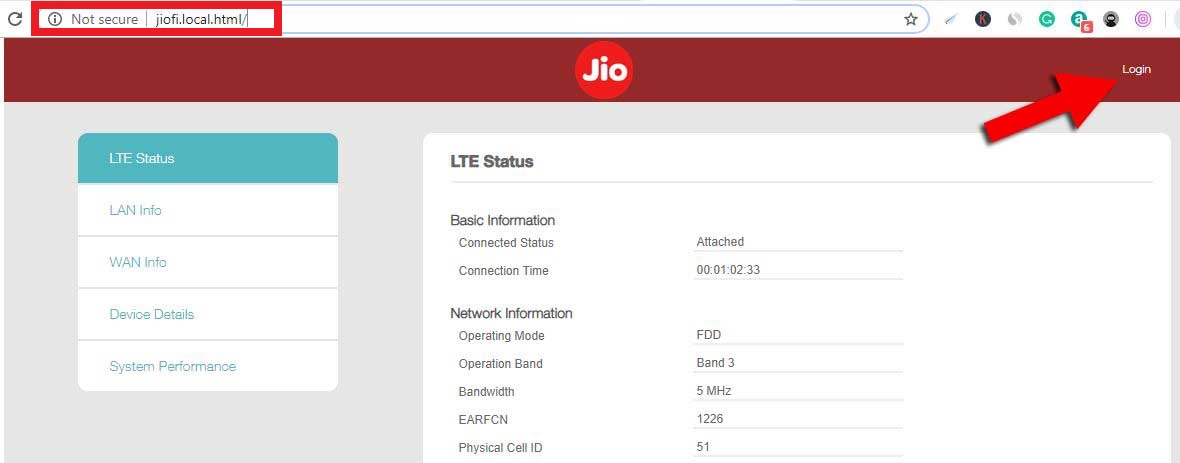
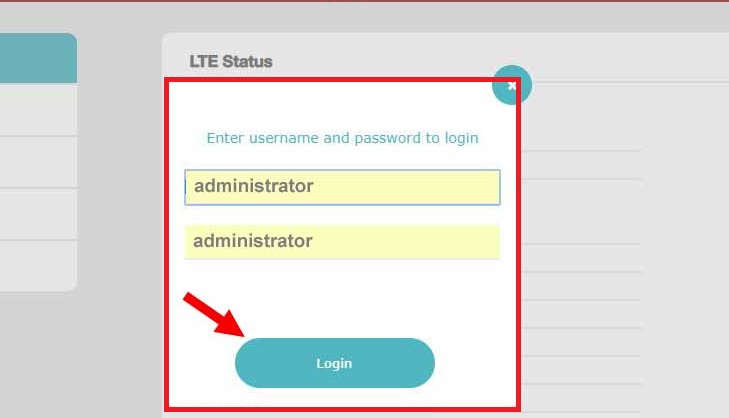
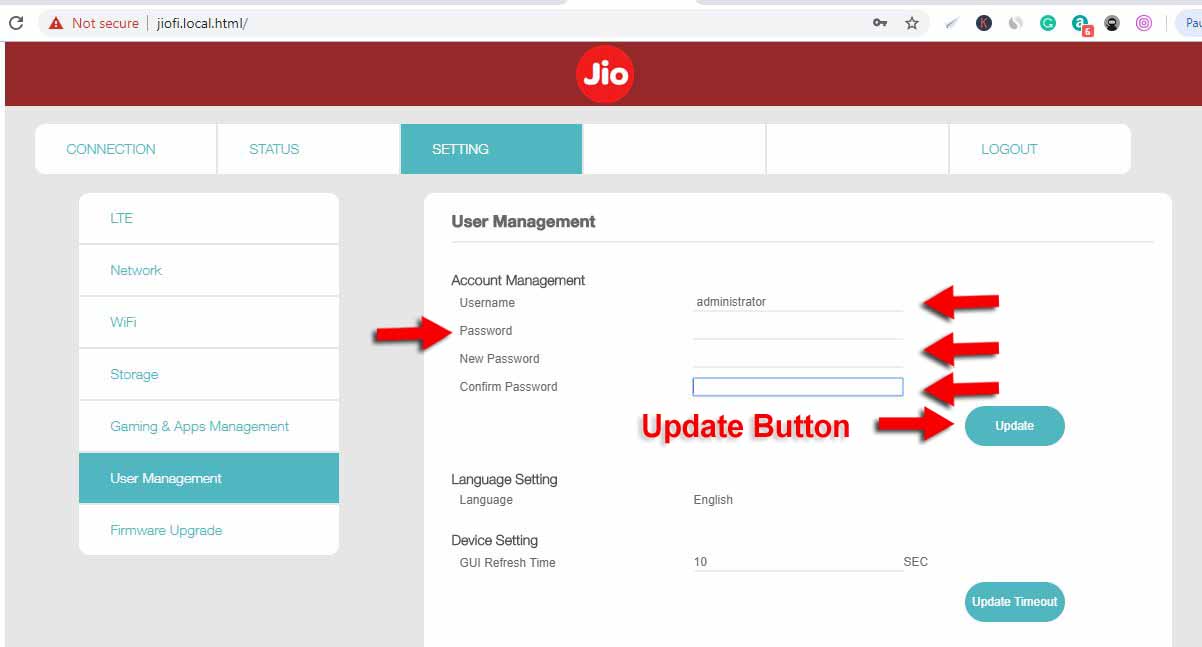
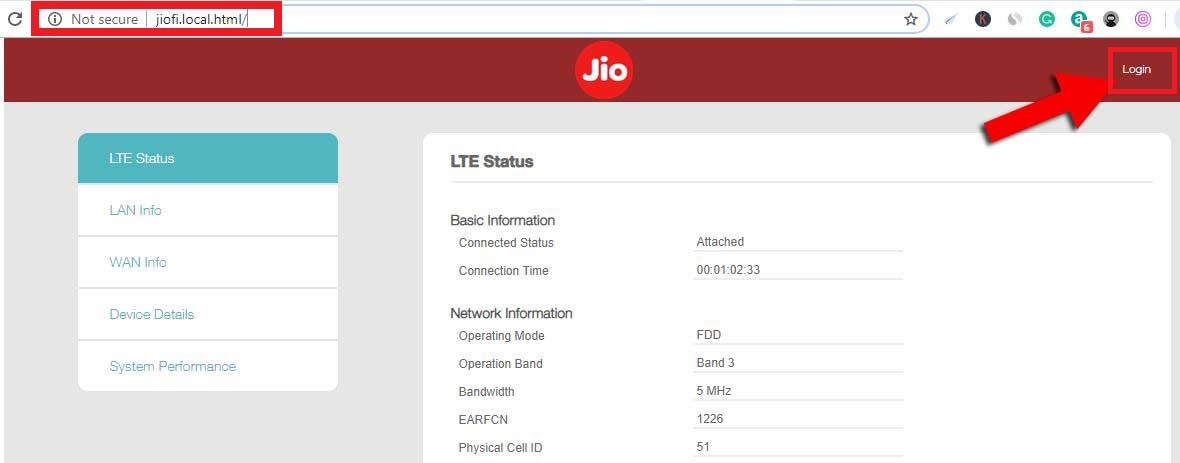
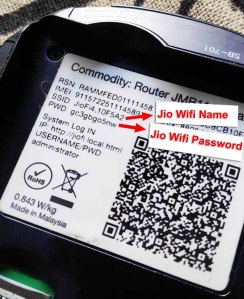
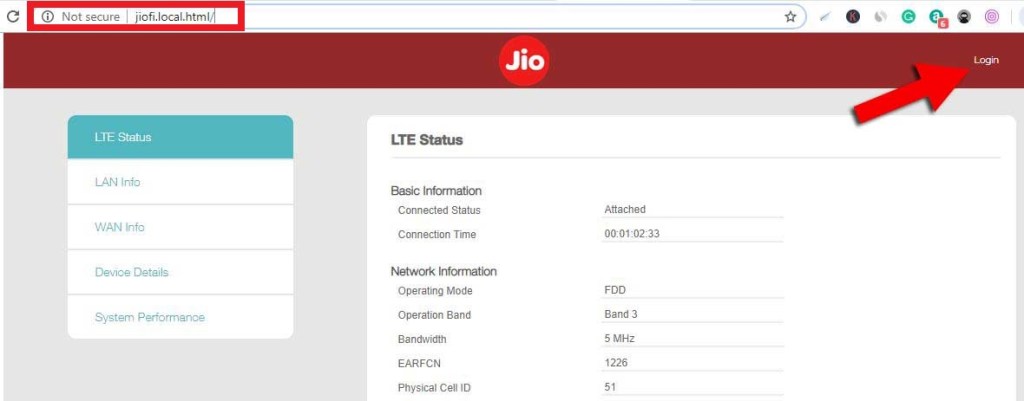
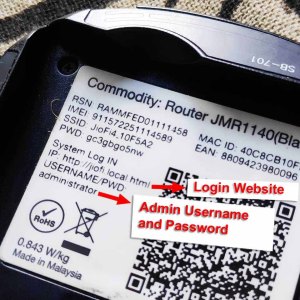
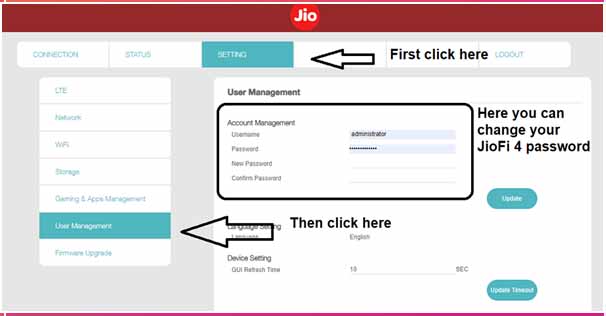
Also read: How to change Jiofi Username and Password?

3. Set Jio caller tune by copying

You can also set Jio caller tune by copying it from other Jio users. When you call any Jio user and, if that user has JioTune set as his caller tune then, you hear the option to copy that JioTune. But by copying you can only set that particular song which is set on that user’s number from which you copied.

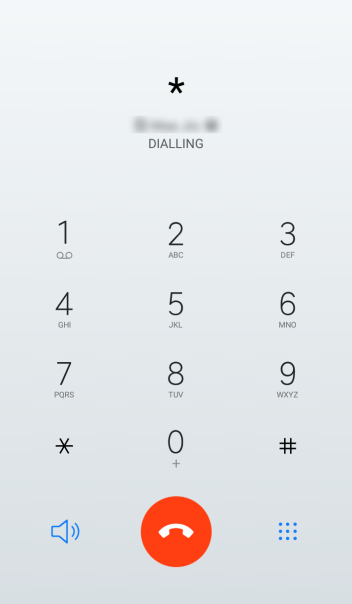
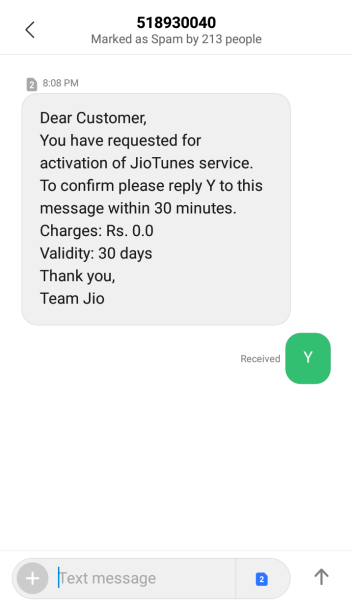
To copy that JioTune simply you have to press the “*” Asterisk button or Star button. After that Jio sends a message to your phone to confirm the activation of that JioTune. Reply “Y” to that message and that JioTune is copied and set as your JioTune.

Steps to set Jio caller tune by copying:-

You can set Jio caller tune by copying it, copy JioTune of another Jio user if you like their caller tune.

Step-1. Call that person whose caller tune you want to copy.
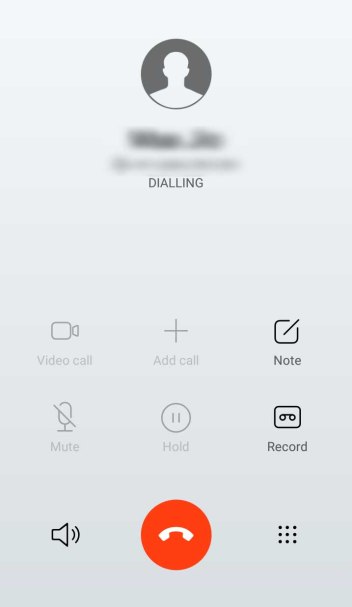
setting JioTune by copying step-1

Step-2. Listen to the song and then press the “*” Asterisk button to copy that song.
setting JioTune by copying step-2

Step-3. When you press the “*” Asterisk button to copy the JioTune then Jio will sends you a confirmation message, reply Y to that SMS.
setting JioTune by copying step-3

Step-4. After replying Y to that SMS Jio sends you an activation message i.e. the JioTune song is activated on your Jio number.

setting JioTune by copying step-4

4. Set Jio caller tune through MyJio app

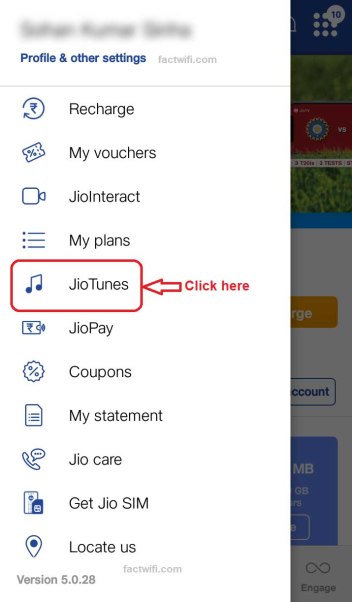
You can also set Jio caller tune through the MyJio app. First, you need to install the MyJio app on your device from the Google play store. After installing the MyJio app you need to log in to the app through Jio SIM card. Now open the MyJio app and select the JioTunes option which is present in the menu.

Now the JioTunes page has appeared on the screen where you can search the song, which you want to be your JioTune. And, select the “set as JioTune” option to set that song as your JioTune.

When you click on the set as JioTune option, You will see an option to listen to the preview of that song which you want to set as your JioTune. Listen to the preview and select “set as Jio tune” to confirm. After that, you will see a confirmation message on the screen that shows the activation of the JioTune.

Steps to set Jio caller tune through MyJio app:-

To set Jio caller tune in your device via MyJio application, you need to install the MyJio app on your mobile phone and then, you have to open and login to MyJio app with your Jio number. If you are using the internet from Jio sim then it will automatically log you into the MyJio app. Now, follow the below steps to set Jio caller tune.

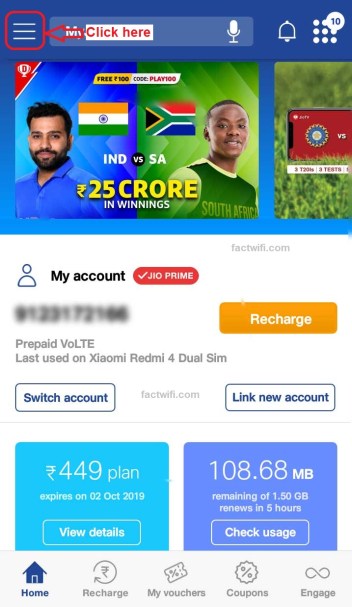
Step-1. Open MyJio application and click on the 3 lines which are on the top-left side on the home screen of MyJio app.
setting JioTune through MyJio app step-1

Step-2. When you click on the 3 lines a sidebar appears, where you see an option JioTunes click on that option.
setting JioTune through MyJio app step-2
setting JioTune through MyJio app Step-2

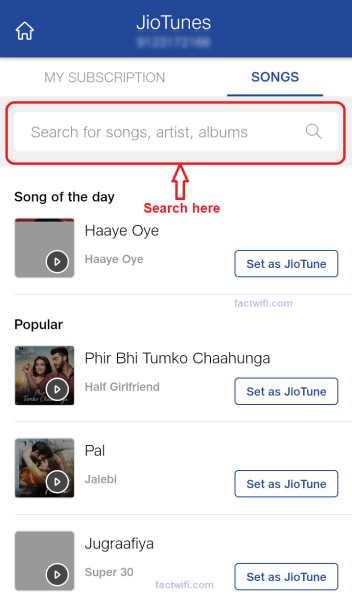
Step-3. When you click on the JioTunes option a menu appears where you can select or search the song which you want to set as your JioTune in the search box. Search box is present on the top of the screen of that page.
setting JioTune through MyJio app Step-3

Step-4. After searching the song you can listen to the preview of that song by clicking on the play button.

setting JioTune through MyJio app Step-4

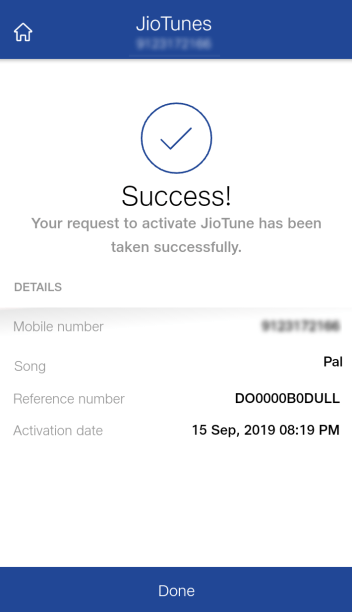
Step-5. Now click on set as JioTune option to set that song as your JioTune and that song is activated as your JioTune.
setting JioTune through MyJio app Step-5

And Jio will send you an activation message on your device in which your Jio sim with that number in which you set the caller tune is in.

setting JioTune through MyJio app Step-6

How to deactivate a JioTune?

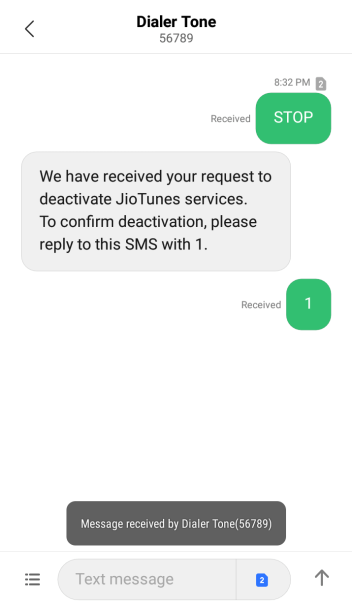
If you want to remove or to deactivate your JioTune simply you have to send the STOP message to 56789. After then Jio sends you a confirmation message reply 1 to that message to confirm. Now your JioTune is deactivated.

Steps to deactivate Jio caller tune:-

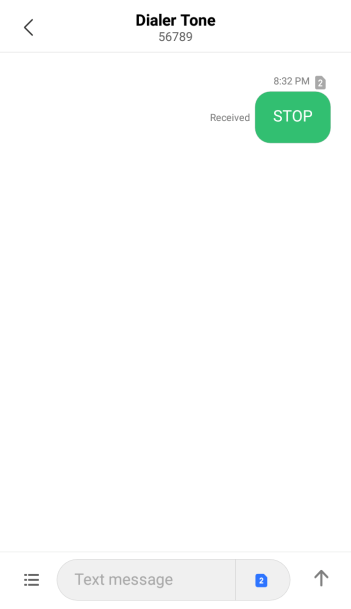
Step-1. To stop or to deactivate the Jio caller tune first you have to SMS STOP to 56789.
Deactivate JioTune Step-1

Step-2. Then Jio will send you a confirmation message reply with to that SMS for confirmation.

Deactivate JioTune Step-2

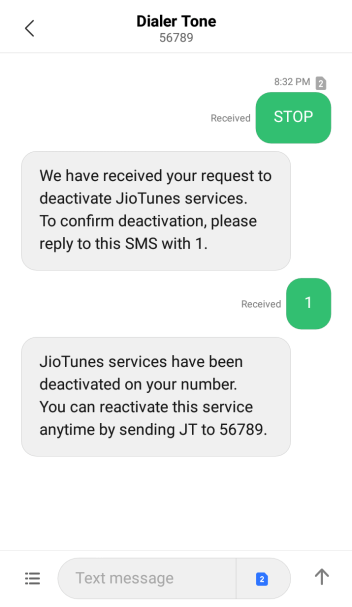
Step-3. When you reply 1 to the confirmation SMS Jio sends you a message that your JioTune is deactivated.
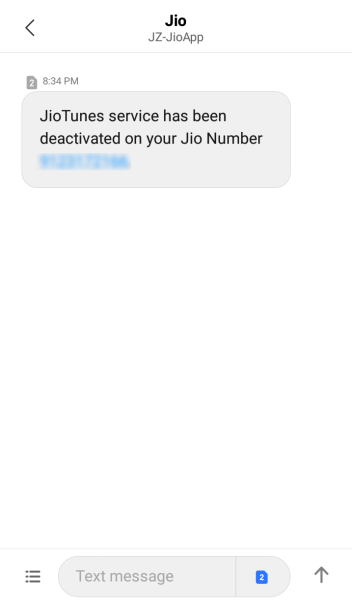
Deactivate JioTune Step-3
Deactivate JioTune Step-3.1

How to set Jio caller tune FAQs:-

Is Caller Tune in Jio free?

Yes, Jio caller tunes are free of cost in Jio and you (Jio users) have not to pay for it. You can set Jio caller tune in your Jio SIM card, which your callers will listen to.

When someone calls me can they hear the music?

Yes, when someone calls you they will hear the song which you have been set as your Jio caller tune. Set the best JioTune as you caller tunes for your callers or someone special.

How can I set a free caller tune in Jio?

You can set Jio caller tune for free in your Jio SIM through the JioSaavn app, through the MyJio app, through SMS or by copy via ‘*’.

  • Install and open the JioSaavan app.
  • Go to the search section in the JioSaavn app.
  • Search the song name to set as JioTune.
  • If the song is available as JioTune.
  • Then listen to the preview and click on set JioTune to set Jio caller tune.
  • Now that song is activated as JioTune on your Jio number.

What is the number of Jio caller tune?

56789 is the Jio caller tune number. This number is already saved in your Jio SIM card, with the name Dialer tone.

How can I listen to my activated Jio caller tune?

You can listen to your activated Jio caller tune via MyJioapp.

  • Open the MyJio app and click on the three bars present on the top left side.
  • Now click on JioTunes option.
  • In JioTunes menu you have to go in My Subscription module.
  • Here in My Subscription module, you can listen to your activated Jio caller tune.

How do I remove the Jio caller tune from Jio?

You (Jio users) can remove or deactivate the Jio caller tune from your Jio SIM card by sending STOP SMS to 56789.

  • Send STOP SMS to 56789.
  • Then Jio sends you a confirmation message reply to that SMS.
  • Now Jio caller tune service is stopped in your Jio number.

Also read:- Cloud Hosting: What is Cloud Hosting and how does it work?

conclusion:-

I think all of your doubt related to Jio caller tune is cleared now. If you have any other queries related to this article then you can ask me in the comment section below or You can mail me at factwifi@gmail.com.

Thank you for reading this article. You can follow FactWiFi on social media sites.

100+ Best Jio caller tune songs list | List of Best Jio caller tune [romantic, sad, motivational, devotional, all-time best in Hindi.]

Best jio caller tune

What are the Best Jio caller tune songs list? List of Best Jio Caller tunes.

Hii guys, welcome to FactWifi today in this article I gonna tell you about the best of the best Jio caller tune songs list of different categories.

Music a form of inspiration, music can swing anybody’s mood. Music inspires you to live, to be happy, to love, to be loved, to feel sad, it also motivates you. So, set not only a good Jio caller tune set the best Jio caller tune. Commonly Jio caller tune is also known as JioTune.

This article helps you to find your favorite song as your caller tune because I am telling you about 100+ best caller tune songs in this article.

But first, you have to learn that What is a Caller tune? then you can set the best Caller tune or JioTune according to your mood or according to your language preferences.

[toc]

What is a caller tune?

What is a caller tune?

Some people think that caller tune and ringtone are similar but they are not similar. A ringtone is a tone that you listen when someone calls you before answering the call whereas, a caller tune is which other listens when they call you.

You can set different ringtones for different contacts in your contact list but, you can not set a different caller tune for different users. Everybody that calls you will listen to the same caller tune which you have been set as your caller tune. But nowadays most of the operators provide you to set different caller tune for different users or callers as you wish.

Most of the people want to set the caller tune in their Mobile Number. They use different operators like Vodafone, Idea, Airtel, Jio, etc. and want to set a caller tune in their mobile number. But they do not know about set caller tune in their mobile number. And they want to know about set caller tune in Jio, Set caller tune in Idea, Set Caller tune in Vodafone and Set caller tune in Airtel, etc.

What is JioTune or Jio Caller Tune?

What is JioTune or Jio Caller Tune

JioTune is a caller tune which is provided by the JioSaavn app. JioTune is only available for Jio users i.e. only Jio users can set a JioTune as their caller tune.

Jio caller tune is free of cost i.e. you have not to pay for JioTune. You can change your JioTune many times as you want. Jio users can set songs of their choice as JioTune. You can select JioTune from a huge collection of songs in the JioSaavn app. JioSaavn app is available in the play store you can download it from there.

What are the Different Between Caller tune and Ringtone?

Caller Tune vs Ring Tone

Generally, most of the people are confused for Caller tune and Ringtone. Most of the people are thinking, it is no different between Caller tune and Ringtone. Some peoples know Caller is Ringtone and vise Versa. But both are different.

Caller tunes are what you are listening from your phone when you calling someone and Ringtone is what you listening from your phone when someone calling you.

What is JioSaavn?

Reliance Jio has a music app named Jio music. Reliance Jio combines his Jio music app with the Saavn music app and made a new app that is JioSaavn. So, Jio Saavn is a music app that also provides you, free caller tunes. You can select from thousands of songs from this app in different languages as your caller tune.

JioMusic+Saavn=JioSaavn

JioSaavn only provides Jio users to set Jio tunes as a caller tune. JioSaavn provides sections of music according to your mood or your regional language preference also. It also has a section where you can listen to music from a particular singer.

JioSaavn is available in Google play store you can easily download it from there by searchingJioSaavnmusic app name in the search section or click here to download.

How to Find Best and Suitable Caller Tune for you?

Most of the people facing the problems about finding the best and suitable caller tune for himself. And they set the wrong caller tune on their mobile number.

I will tell you that which JioTune is suitable according to your mood preference ( like best romantic Jio caller tune, best sad Jio caller tune, best motivational Jio caller tune, best devotional Jio caller tune).

Which Jio caller tune is suitable for you according to your language preference (all-time best Jio caller tune in Hindi, all-time best Jio caller tune in English and all-time best Jio caller tune in Panjabi).

Your name Jio caller tune ( Name Jio caller is available only for few common names). Best trending Jio caller tune, best evergreen romantic Jio caller tune.

Best JioTune of specific artists like Darshan Raval, Arijit Singh, A. R. Rahman, Neha Kakkar, Atif Aslam.

Also Read:-

  1. How to change Jiofi Username and Password?
  2. How to Set Caller tune in Jio?
  3. How to set caller tune in Airtel?
  4. How to set caller tune in Vodafone?
  5. How to set caller tune in Idea?
  6. How to Contact Amazon Customer Service

Best Romantic Jio Caller Tune Songs list

Best Romantic Jio Caller Tune Songs list
Best Romantic Jio CallerTune Songs list

Love stories are never completed without any romantic song. All of you can not sing but you can set a romantic caller tune to describe your love to someone. Romantic songs are basically for couples if, you want to show your love to your partner then you must set a romantic caller tune.

Using a romantic caller tune you can express your feeling, emotions & love to your caller and especially for your lover who loves you.

Here are some of the Best romantic caller tunes or JioTunes listen to them and set one of the best romantic caller tunes for the partner and make them feel your love.

Best Sad Jio Caller Tune Songs list

Best Sad Jio Caller Tune Songs list
Best Sad Jio CallerTune Songs list

Music not only describes your feeling it also describes your emotions. If you are happy you love to listen to joyful songs but if you are sad your mood is off then at that time you listen to the sad songs. Sometimes you want to describe your feeling and emotions to others then you set sad caller tunes.

So, set one of the best sad caller JioTune from the given list and make your callers feel your emotions.

Best motivational Jio caller tune Songs list

Best motivational Jio caller tune Songs list
Best motivational Jio CallerTune Songs list

Its time to get up and get inspired and music is one of the best ways to be inspired and be motivated. Music motivates you to achieve your goals and to fulfill your dreams.

Set one of the best motivational JioTune to motivate your callers too. Here are some of the best JioTunes choose one of them as your JioTune.

Best devotional Jio caller tune Songs List

Best devotional Jio caller tune Songs List
Best devotional Jio CallerTune Songs List

Devotional songs are basically for religious people. The devotional music shows your faith and trust in god. This type of music flows good energy in you. It helps you in meditation.

Some of the devotional songs such as the Gayatri mantra help you in meditation and it also helps you to get your inner peace. Bhajan, Kirtan, Aarti are the kind of music that comes under the devotional music section.

Devotional music is also categorized according to religion such as Sufi music is also a piece of devotional music. Sufi music is the music of Sufis. Dapha music is also a piece of devotional music. It is one of the oldest devotional music of Nepal.

Choose one of the best devotional music from the below list for your caller to make them feel devotional too.

All-time best Jio caller tune Songs list in Hindi

All-time best Jio caller tune Songs list in Hindi
All-time best Jio CallerTune Songs list in Hindi

Hindi songs touch your heart and you can feel the song. Some songs never become old and they always make your mode. Here is the list of some all-time best Jio caller tune in Hindi. Listen to them and choose one of the best JioTune from the list below as your caller tune.

All-time best Jio caller tune Songs list in English

All-time best Jio caller tune Songs list in English
All-time best Jio CallerTune Songs list in English

Like Hindi songs some Engish, songs are also the best of their time & they also touch your heart and you can feel the song. Some songs never become old and they always make your mode. Here is the list of some all-time best Jio caller tunes in English. Listen to them and choose one of the best JioTune from the list below as your caller tune.

All-time best Jio caller tune Songs List in Panjabi

All-time best Jio caller tune Songs List in Panjabi
All-time best Jio CallerTune Songs List in Panjabi

Hindi and English songs touch your heart and make you feel the song in your heart. Some Punjabi songs are also awesome at their time and make you energetic. Some songs never become old and they always make your mode. Here is the list of some all-time best Jio caller tune in Punjabi. Listen to them and choose one of the best JioTune from the list below as your caller tune.

Name Jio caller tune

Name Jio caller tune

Users can set their names as their JioTune, but not all users. Name JioTune is available only for few users having common names. If you find you your name in this category then you are a lucky person. Name JioTune is available for a total of 100 users.

Some common names available in this name JioTune category are Abhishek, Amit, Ankit, Chandan, Dilip, Harish, Jay, Kishor, Manoj, Nitin, and many more other names are also available.

How to set name Jio caller tune

To set name JioTune you have to SMS to 56789. Send ALBUM Name Tunes as a message to 56789 after that they will send you a message with names list. If you find your name on that list then reply with the no. of your name from the list. If you do not find your name on that list then reply with MORE for more names.

Conclusion!

I hope that you have found a suitable Jio caller tune from the given lists of best Jio caller tune. If you want any other categories of the caller tune then please comment in the comment section below.

Thank you

Cloud Hosting: What is Cloud Hosting and how does it work?

What is Cloud Hosting and How Cloud Hosting works?

When you think to create a website or already created a website, at that time a question is arise in your mind, how to keep your website on the internet to reach a lot of people. Then you do start searching on the internet “How to live my website? or How to keep my website on the Internet?

And finally, you founded, you need a “web hosting” (where keep your website Files) for your website, but you confused what is web hosting and which types of web hosting should be purchased because you found the various types of web hosting plan available on the internet.

Also read: How to change Jiofi Username and Password?

But you don’t worry in this article I will discuss, the best Web Hosting for your website which helps you to buy the best web hosting. Finally, you will see in this article about “cloud hosting”.


Cloud hosting is the most popular or latest form of hosting which maintains the popularity in the recent year.  It provides you to host your website on the internet with high-speed accessibility.

[toc]

Understanding the cloud?

Understanding the cloud

When we are talking about the cloud there is no physical thing that you can point to and label as the cloud. Just like with cloud hosting there is also not a single physical server that you can point to and say, that is a cloud host.

It is a way of storing data across multiple computers and accessing that data through a network connection like the Internet. The cloud acts as a single physical computer, with a lot of processing power and storage space.

What Is Cloud Hosting?

What Is Cloud Hosting?

This is the most popular or latest form of hosting which maintain the popularity in the recent year. It follows the “dividing rules” the recourses required for your website are stored on the multiple web server and provides as per need basis. It reduces the chances of downtimes of your website in any cases.


Another Cloud Hosting allows you to manage to load your website is very easily and fastly without facing any bandwidth issues. While another server provides additional resources when these types of cases have occurred. Hence, your website does not rely on the only one server, and rather a collection of servers that work together like a cloud.


Cloud hosting provides more ways to configure your services. And keep your website on the server to reach more people. In general server configuration, you faced the limited constraints of the server where your website is hosted on. While with cloud hosting you rely on a unique server a configuration that lets you access from multiple different servers, which results to boost your website on the internet with high speed.

It may be a better option compared to shared hosting because of cloud hosting able to handle large amounts of traffic, and also its improved high-security protection, and its reliability. but most cloud hosting is more expensive compared to shared hosting plans.

Cloud hosting is always the best hosting plan for you when you compared to VPS hosting since it is hosted on multiple servers which takes advantage of multiple physical networks. While VPS hosting is less efficient since it has only a limited amount of computing resources to each client.

In this Web Hosting the website is hosted on the multiple servers. When any user tries to access your website at that time the nearest server is connected to the particular user and he accesses your website is easily and very fast. Because of this reason, this is the fastest hosting.

Example of Cloud Hosting.

The best and popular example of this hosting is Google itself? Which is the king of the search engine, Google spreads its recourses over hundreds of servers.

Also read: how to login Jio Wifi Admin?

How does Cloud Hosting work?

How does cloud hosting work?

The easiest way to understand the work of cloud hosting when it compares to a single server modal, with dedicated hosting, you have a single server where the store your website and all files of your website. When a user tries to visit your website these files are then served up from that single a physical server which takes some times.

Compare this to a cloud hosting server where your website or all files of your site can drown from different-different virtual server environments.

In general, sense, if your website is a host on a physical server and that server, is in America. A user wants to visit your site, at that time the user’s computer is first connected to your server which resides in America then he accesses your website. However, in this process the user faces more time consuming to accessing the website, it means slow to load your website in the user’s computer or mobile.

But in case you used cloud hosting, User access your website is very fastly because it provides different virtual server environments. User computer or mobiles is connected to his nearest server, because of this reason, they accessed your site is fastly compared to physical hosting.

There are a lot of benefits. Which helps you to buy the best hosting for your website and many more.

  • The cloud server provides more security and user stability, It avoids all hardware issues seen with physical servers, and cloud hosting is the most stable option for your businesses in your budget.
  • It provides faster service for your website, you will get more recourses and faster services compare to similar price of any physical server. A cloud-hosted website will run very faster.
  • In this Hosting, when you need to upgrade you hosting resources like memory and disk spaces, you can easily do this as well as being more affordable. You feel more scalability with cloud servers

What is the top 10 Cloud Hosting Provider Company?

Here the list of top 10 Cloud Hosting service provider as follow.

  1.  

What is the Future of Cloud Hosting?

Cloud Hosting: The Future of Cloud Hosting.
he Future of Cloud Hosting.

This is the popular Web Hosting from the recent year, and every large Enterprises and Company are using it, for his website for many years together, while for the small business owners may not afford this hosting because the cost of this hosting is little high compared to physical hosting.


Because of its huge popularity and services the small and medium-size organizations to make a move to the Cloud Host. It will also popular in the future. Because it provides lots of features compare to the physical server.

Thank You!